 Twenty Questions
Golinx Setup and Build
This post covers set-up and build in my series on golinx, a simple web app to create URL shortcuts. The gist is to package golinx as a self-contained web app, and to make the development lifecycle as easy, repeatable, automated and portable as possible. For more context on golinx itself, see the introduction.
Simplifying build
My first goal with golinx is to easily and repeatably build, test and run the app. This is so that future-me setting up a new machine, or deploying it somewhere fresh can easily pull the code down, run a build script, and start developing or using it with little fuss. Using version control is obvious and assumed, but I’ll describe why I’m using Bazel and docker in more detail farther down.
It’s a bit of a leap to think of packaging in the same breath as your first build, but it’s a worthy consideration so that you can tailor your build environment to ease packaging your app. Packaging can mean different things in different contexts. For example, if your infrastructure consists of basic Linux servers, then you might want to package your app inside a DEB or RPM that includes systemd startup scripts, and other auxiliary config apart from the app itself. If you’re writing a statically-linked binary, then you might not need to do that because you could easily just drop the binary and run it with the right command-line arguments (side note: consider how to do config). If you’re running a project written in an interpreted language, then you’ll need some way to gather up all your scripts and their dependencies to drop onto your deployment target. Finally, in today’s world it makes sense to just package it as a container, which helps gloss over underlying infrastructure concerns so that you-the-developer can finely specify how the application should run. I’ll cover more on this in a bit, but first a note on some Python specifics.
Python specifics
I’m opting to avoid Python-only build solutions like setup.py, because in
future iterations I’d actually like to try rewriting parts with golang, Java, or
really anything else. That said, there are a few things you can do to ease
Python development, such as:
- For local development, take advantage of both pyenv and virtual environments.
- Use
pip-toolsand itspip-compileutility to take a set of your code’s direct dependencies contained in arequirements.infile, and generate a fullrequirements.txtwith pinned versions and annotations on provenance for each indirect dependency.
The above would go something like:
# Create a venv to isolate your project's dependencies.
cd ~/projects/golinx
Python -m venv env
source env/bin/activate
pip install pip-tools  # Provides pip-compile

# Specify your direct dependencies; alternatively use setup.py
vim requirements.in
pip-compile requirements.in > requirements.txt
git add requirements.txt

# Specify extra dev-only dependencies in a dev-requirements.in, which should
# start with `-c requirements.in`.
vim dev-requirements.in
pip-compile --output-file=dev-requirements.txt dev-requirements.in
git add dev-requirements.txt
No matter how you’re building your project, for anything using Python the above steps will ease a lot of headaches with dependency management.
Bazel
Considering how to build and package golinx, it falls into the third case above: it’s written in Python and is a collection of pip dependencies and modules. Bazel is an open source version of Google’s internal build tool. Its major benefits are that it caches build objects (tightens the write, build, test loop), is cross-language and cross-platform, and is extremely extensible with the Python-like skylark scripting language. Above I mentioned that eventually I’d like to rebuild golinx in other languages, and Bazel will greatly simplify that process.
For this first iteration in Python, you can reference pip dependencies, and
generate self-contained Python archives that are ready to pass around and
deploy. Because of its extensibility, there are even rules that let you build
Docker containers and push them to a registry. The line with deployment gets
blurry here, but you can imagine using this tool as part of a CI/CD pipeline.
Refer to the Bazel site for the best intro material on it as a buildtool,
and for more context within golinx, the WORKSPACE and
golinx/BUILD files are the two best places to see how Bazel works.
WORKSPACE
The WORKSPACE file essentially bootstraps your project by loading external
rules that do more than Bazel’s built-ins, and by wrangling non-Bazel projects
into a form you can import to your Bazel project. Here’s a snippet that shows
how to wire up the first-party rules_python and
third-party rules_python_external, which provides
support for transitive pip requirements (something confusingly not provided
out of the box by the first party rules).
# ~/projects/golinx/WORKSPACE

load("@Bazel_tools//tools/build_defs/repo:http.bzl", "http_archive")

http_archive(
    name = "rules_python",
    url = "https://github.com/Bazelbuild/rules_python/releases/download/0.0.2/rules_python-0.0.2.tar.gz",
    strip_prefix = "rules_python-0.0.2",
    sha256 = "b5668cde8bb6e3515057ef465a35ad712214962f0b3a314e551204266c7be90c",
)
load("@rules_python//Python:repositories.bzl", "py_repositories")

py_repositories()

rules_python_external_version = "3aacabb928a710b10bff13d0bde49ceaade58f15"

http_archive(
    name = "rules_python_external",
    sha256 = "5a1d7e6e4bab49dcdd787694f0f5d52ac5debdfc1852981a89cc414e338d60dc", # Fill in with correct sha256 of your COMMIT_SHA version
    strip_prefix = "rules_python_external-{version}".format(version = rules_python_external_version),
    url = "https://github.com/dillon-giacoppo/rules_python_external/archive/{version}.zip".format(version = rules_python_external_version),
)

load("@rules_python_external//:repositories.bzl", "rules_python_external_dependencies")
rules_python_external_dependencies()

load("@rules_python_external//:defs.bzl", "pip_install")
pip_install(
    name = "py_deps",
    requirements = "//:requirements.txt",
)
Also check out //toolchains:golinx_py_toolchain, which tells build
rules to use a different path for the Python interpreter when generating run
scripts for a packaged Python application (important because there’s skew
between the default and what you might use in the official Python docker
image).
golinx/BUILD
Across languages, basic set up for Bazel build rules is to create
xxlang_library rules that define the libraries you’ll compose into an
application, and then create a single xxlang_binary rule that actually
composes the libraries and points to an entrypoint (e.g. main.py).
golinx/BUILD shows how to create and add a few py_library rules
into a runnable py_binary script. It also demonstrates packaging the app into
a docker container you can then run.
# ~/projects/golinx/golinx/BUILD

load("@rules_python//python:python.bzl", "py_binary", "py_library")
load("@py_deps//:requirements.bzl", "requirement")
load(
    "@io_bazel_rules_docker//container:container.bzl",
    "container_image",
)
load("@io_bazel_rules_docker//Python3:image.bzl", "py3_image")

package(
    default_visibility = ["//golinx:__subpackages__",]
)

py_library(
    name = "utils",
    srcs = ["utils.py"],
    deps = [
        requirement("Flask"),
    ],
)

py_binary(
    name = "main",
    srcs = ["main.py"],
    data = [
        ":templates",
        ":static",
    ],
    deps = [
        "//golinx/controllers:link_controller",
        "//golinx/models:db",
        requirement("Flask"),
        requirement("absl-py"),
    ],
)

# Packages static files into the generated "binary" archive.
filegroup(
    name = "static_assets",
    srcs = glob([
        "static/*",
        ])
)
...
Long story short, the beauty of using Bazel is that you can clone the repo, and simply run the following to start a local server:1
# The first "--" tells bazel to pass subsequent flags to the called binary.
bazel run //golinx:main -- --port=5080 --init_db
When you run this command, Bazel generates a script that sets up your Python
path and runs everything (from the project root, take a look at
bazel-bin/golinx/main). Bazel will then go pull all your dependencies, and
pass the flags onto your binary. You can also package your app into an
executable archive using subpar rules
or, into a docker container with rules_docker.
I’m using the latter in golinx, like so:
# Generates a local bazel/golinx:container image
bazel run //golinx:container
docker run bazel/golinx:container -p 5080:5080
I’ll cover more of these details in another post on docker and deployment, but this rounds out to a nice development environment.
Use explicit dependencies
I don’t know if you can get Bazel to enforce it, but for each py_library
and py_binary you should explicitly list dependencies per module to
prevent surprising behavior later on. To illustrate, consider an example where
you have a triangular dependency tree with three modules: a, b and c.
a.py
from app import b
from app import c

if __name__ == '__main__':
    b.hello('a')
    c.hello('a')
b.py
from app import c

def hello(caller: str) -> None:
    c.hello('b')
    print(f'hello to {caller} from b')
c.py
def hello(caller: str) -> None:
    print(f'hello to {caller} from c')
This is a situation common in many projects (e.g. ones that depend on a framework that does so much, like Flask). Visually, this looks something like below:
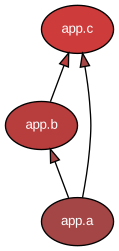
From a Python perspective, you only need to state your application’s
dependencies in a top level requirements.txt and/or setup.py, and install
them with pip (pretend c is actually an external package). Then the
dependencies will be added to the Python path automatically and ready for import
in your modules after installing. This is convenient and practical, especially
if you’re a Python-only shop.
Bazel takes a slightly different approach. It builds a dependency graph using
your build rules' deps properties, which helps it cache work and speed up the
code/build/test loop. This is incredibly power for compiled languages but also
speeds up running test suites since it can determine the downstream impacts of
edits and only re-run the corresponding tests. It can also help external
tooling index your code and intelligently link it. Specifically regarding
Python, the py_binary build rule will only provide the dependencies you
specify when crafting the Python path used in the script it generates to run
your application. Because of how the Python path works, this would be a working
set of build rules for your app:
# Bad //app/BUILD

py_library(
    name = "c",
    srcs = ["c.py"],
)

py_library(
    name = "b",
    srcs = ["b.py"],
    deps = [
        ":c",
    ],
)

py_binary(
    name = "a",
    srcs = ["a.py"],
    deps = [
        ":b",
    ],
)
Note that the direct dependency on c isn’t listed on a. It would still build
and work, but you risk a scenario where you factor the dependency on c out of
b, and end up in a confusing situation where c was no longer available for
use by a, even if you have it in your requirements.txt, because Bazel will
only generate a package with exactly what you specify in these build rules.
Because of this, you should be careful to state each module’s dependencies in
full, even though a would implicitly have access to c through b like so:
# Good //app/BUILD

py_library(
    name = "c",
    srcs = ["c.py"],
)

py_library(
    name = "b",
    srcs = ["b.py"],
    deps = [
        ":c",
    ],
)

py_binary(
    name = "a",
    srcs = ["a.py"],
    deps = [
        ":b",
        ":c",  # Captures the direct dependency of a on c.
    ],
)
Again, this also lets tooling that knows little about Python understand the connections between each of your build units.
Other tips and caveats
There are a couple other things to keep in mind when using Bazel.
Leverage buildifier, which formats BUILD files for consistency. If your IDE has integration with Bazel, then it’s probably got an option for this, but you need to add it separately since it doesn’t come packaged with Bazel as of this writing.
Bazel isn’t all roses. Because it’s a new-ish open source project it can feel pretty beta. Originally written for use inside Google, some of the supporting tooling and assumptions are missing and not available out of the box in the open source version. You might have to roll up your sleeves to get some things done, and other interfaces might change faster than you’d like. Even so, it’s a fun way to specify your builds, and I believe it really speeds up development.
I would like to explore some alternatives to Bazel, like Pants, Buck or even
just plain old make. For updates, keep an eye on #build and
this series.
-
For sanity in case you run this in the future, here’s the version info for both Bazel and golinx:
↩︎bazel --version # bazel 3.1.0 cd ~/projects/golinx git rev-parse HEAD # a96650b1c7d0f76fa15cbf895237449f64bb1e63